Showing posts with label photos. Show all posts

Monday, 20 January 2014

How to Use Pinterest to Drive Sales

Chances are, you're already well aware of Pinterest's popularity as a social networking platform. Since its launch in 2010, the site has amassed over 70 million users, who rely on the site to collect everything from recipes to style tips in beautiful, pictorial form. Still, popular or not, that age old social media question is still worth posting: is there any way for businesses to actually profit from the platform?


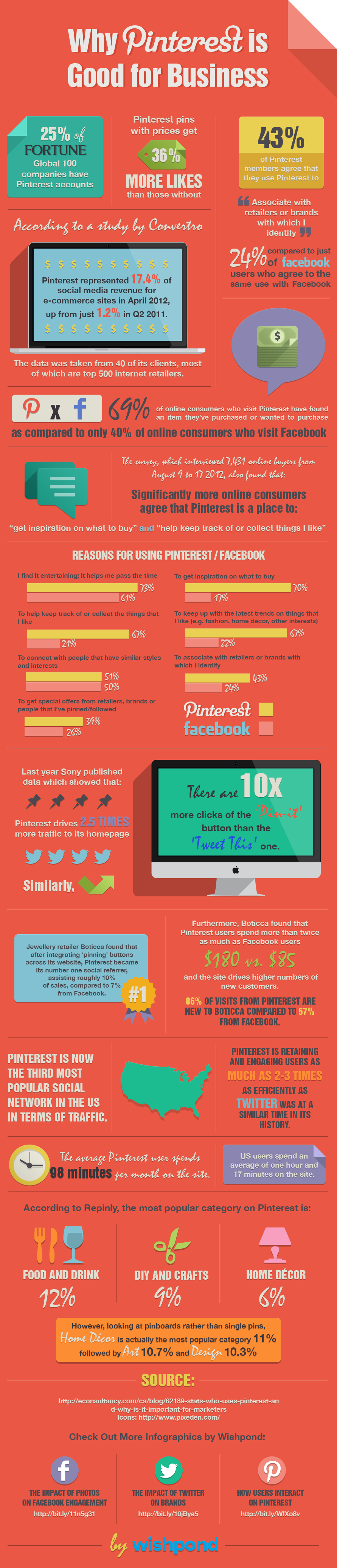
The answer is yes, yes, 100 times Harry & Sally restaurant scene yes. For starters, Pinterest users are simply more engaged than Facebook and Twitter users. In fact, several case studies have shown that Pinterest users specifically flock to the site to keep up with trends, get inspiration for what to buy, keep up with brands they like, get special offers, and keep track of things they like. These, of course, are all behaviors that transfer naturally into buying and brand loyalty. While this is somewhat of a draw for sites like Facebook and Twitter, marketers have to be far more careful on those sites to fit into the more social landscape. How much you can market on any given platform, after all, depends on how willing and ready consumers are to receive your message in that arena. On Pinterest, they're primed.

Not surprisingly, this has big implications for marketers and businesses, which can effectively use the platform to engage followers, offer coupons, and drive traffic between its Pinterest presence and online stores. What's more, the same benefits are available for big businesses as they are for small-time craftpreneurs looking to drive traffic to an Etsy store or another third party platform.

So, how can you use Pinterest to drive sales? Let’s take a look.

1. Create an Ecosystem of Boards
The great thing about Pinterest is that it allows you to have a diverse presence on the platform, rather than a single feed. By creating multiple boards, you’ll be giving both your marketing team and your followers several different frameworks within which they can engage more creatively with your brand. (And engagement, in the long term, drives sales through brand awareness and loyalty). Boards will of course vary based on the kind of business you're promoting, but a few good ideas include:
  • Lifestyle boards for different themes. This can really run the gamut. All Recipes, for example, has one board for healthy recipes, one for slow cooker recipes, and so forth. A clothing company might have one for A-Line fall skirts, or back to the office wear. The possibilities are really endless.
  • Event boards. As spring fashion week unfolded, Elle followers could follow developing fashion trends as the brand pinned the latest fashions from its front row seat. An event board like this will make your followers feel like they're in the know, even from far away.
  • Coupon boards. Coupon boards are the most direct way to drive sales through Pinterest. They're easy to create, too. Just design a coupon image like you would for any other campaign, post it to your coupon board with all relevant details, and have it link back to a page on your site where the coupon can be redeemed. Alternatively, just add a code to be entered at checkout.
  • Contest boards. Travel companies have proven particularly adept at Pinterest contests, inviting followers to follow their boards and pin photos from their favourite dream destinations around the world in return for free hotel stays or airfare. However, contests can take many different forms, with the added benefit of being inherently shareable on other social media networks thanks to the visual nature of the form. Just be safe, to brush up on current contest regulations before launch, as the site has recently placed more restrictions.
  • Sneak peeks. In today's social media landscape, customers expect their brands to feel personable and accessible. A Pinterest board that gives customers a sneak peek into how your product is made or even what life is like around the office is a great way to do just that.
  • Customer boards. Last but not least, why not have a board dedicated solely to customer pins? This could be photos of customers using your products in creative ways, ideas for new products, or anything else that feels relevant to what you do.


2. Take Excellent Photos
Naturally, an image-heavy platform is only as good as the images you post to it. This means taking clear, high resolution shots in good lighting without any shadows or busy background. In fact, a recent study posted on Wired.com found in its analysis of this popular Paula Deen Pinterest photo found that good photos: avoid human faces, focusing only on the product; use multiple solid colours, most especially red; go for about 50% colour saturation; and are portrait rather than landscape style. Images that followed these criteria were shared at much higher levels than those that weren't.

Additionally, it's important to pack as much information into the image as possible without detracting from the aesthetics. This is best when done through visual cues, like showing the products or materials used or showing how the product can be applied in the real world. When that can't be achieved, a minimum of text can still be effective if artfully integrated.

3. Optimise Your Pinterest Presence
SEO is just as important on your Pinterest page as it is elsewhere, as there's not much use in having a Pinterest presence if no one can actually find you. To optimise your presence, make sure to integrate the same keywords you use across your social media and webpages into product descriptions and on your about page. It's also good practice to include links back to your other sites in your about page as well so that customers can easily follow you on whatever platforms they find most engaging. Of course, links are even more important in product descriptions, so followers can easily buy the product you're promoting.

4. Use Rich Pins
One of the newest offerings from the platform, rich pins are an incredibly effective way to give your followers a much deeper understanding of the products you feature on your Pinterest page, as well as ways that they can buy that product or become more deeply involved in your brand. The first kind of rich pin is called a product pin, which allows you to include a price for the product below the image, which changes as the price does. This is obviously the most directly connected to driving sales. However, you won't want to miss: place pins, which integrate a map and contact information onto your page; article pins, which help followers easily save your content marketing blogposts or any articles written about you; and recipe pins, which are obviously great for any company with a need for a recipe board, as they make it easier for followers to actually put together the recipes provided.

5. Promote Your Pins
Another great new feature on Pinterest is price alerts. With this feature, consumers will receive alerts every time the price of a product they've pinned changes. That can be a big motivator, especially when you've got sales going, but it's entirely dependent on the consumer having actually pinned something in the first place. All of the strategies we've discussed so far will work towards those ends, but there are a few other things you can do specifically to drive pinning.
  • Pay for a promoted pin. This has yet to roll out, but when it does, the concept is presumed to be much like promoted tweets, with your promoted pin appearing higher and more prominently in search results. Of course, you'll want to save these for special moments, like when you really want people to know about a contest.
  • Cross-promote. It's never a good idea to showcase your products in just one place. On your website, make sure to add a Pinterest button to every product listing or bit of content marketing. Likewise, don't be afraid to post links to your pins on your other social media sites, so that all of your followers across platforms know what you've got going on.
  • Talk to your pinners. Pinterest users are engaged and motivated to buy (80% make a decision within three weeks of pinning). But that doesn't mean they can't do without a little nudging, especially within that critical period. Don't be afraid to reach out to pinners to thank them for sharing, or to offer them an incentive for pinning more or for buying sooner. Just like on other social media sites, pinners like companies that are responsive and that seem down to earth.
  • Collaborate with other pinners. This is an especially effective technique for small businesses and solopreneurs, who can benefit from pinning and showcasing each other's stuff. Doing so means exposing your work to twice the audience, and more exposure means more pins and more customers.

The Takeaway
No matter how you slice it, Pinterest is a powerhouse when it comes to driving online sales. What kind of board will you make first? Let us know in the comments below.

Friday, 15 November 2013

User Advice: Do not consume alcohol while posting

Social media can dominate your day, both socially and professionally. Its a multifaceted service and as good, sober, working people we do wonderful and (sometimes) useful things - we enhance our businesses, blog our well-thought arguments and opinions, share our wisdom etc. Now what happens when we clock off? We leave the office but we can take the social media with us, to access anywhere, anytime... on the tube, at home, in the gym and even in the pub. Great! Or is it??


Image: http://www.legaljuice.com

Alcohol does have the ability to make most people feel fearless. At parties or in bars you may mingle more, become a little looser lipped, but this is no bad thing. We associate this down time with being relaxed and having fun. It sometimes escalates to more wild activities, which are probably completely appropriate for the circumstance you are in...

 
Image: http://www.obnug.com

And that's great. But when you are feeling a little inebriated there seems to be a confusion about logging in to social media and becoming vocal. Celebrities do it all the time but it is quite obvious it is for publicity. I personally don't think we should follow suit.

A meme I saw the other day stated; 'Alcohol increases the use of the send button by 98%'. A very funny commentary on our abilities to be a bit braver after a few...but people seriously seem to really enjoy uploading pretty much anything when they are getting drunk, regardless of the consequences.

There is incredible the amount of people can see your information online and quite hard to remove it indefinitely. Old posts and pics can often still be seen if searched for hard enough and not only is there a fear of your parents seeing an explicit rant or photo it can also affect how your seen in the working world.

If you work for a company who is involved with or uses social media it is very hard to mask a drunken post. You could potentially be damaging your own reputation and the company you work for. This also encompasses potential employers. A huge number of companies now use social media to find out more about their current and potential employees.

One clever online business have coined the idea of the 'social media sobriety test':


Image: http://www.geeksugar.com

'Webroot' have designed this app to help you decide whether or not you should be posting in the state you have got your self in. Giving you options to block certain sites and a time preference it is fool-proofing your phone.

A wonderful way to prevent getting yourself in trouble and keeping the fun at the party...and not worldwide. Just think next time you have a drink or two, maybe leave your phone at home or at least turn off internet access. Either way, however proud you might be of your alcohol-induced photos and potential posts leave it until the morning!

Monday, 7 October 2013

Facebook Graph Search

Facebook’s Graph Search has been described as the “third pillar” of the Facebook site – along with Timeline and News Feed - intended to be used as a tool to fulfil Facebook’s mission to make the world more open and more connected. The feature provides Facebook users with the ability to navigate their own personal connections, making them more useful and providing the opportunity to discover information, old and new. What value will Graph Search have to Facebook users? The latest development of this feature was announced on the 30th September, now allowing people to search posts and statuses as well as old photos, places and people. What effect will this new development have on the use of Graph Search?

Image – www.parature.com

Released earlier this year, Graph Search is already being used by a number of Facebook users, however, only those who are using the site in US English. Graph Search can be used for a number of simple searching tasks, such as finding photos a user has liked in the past, or photos which have two specific people in. It can also help in discovery of new things as well as old posts, pictures or places that people have visited. For example, if you were to visit your friend in a different city, Facebook Graph Search could help you by searching for all the people who live in that one city, whereas previously you would have to search individually through your friends to find this information out.

People do not generally think of Facebook as a discovery tool, however, this is set to change with the use of Graph Search across the platform. Finding things like friends of friends who are interested in the same things that you are is now much easier, other examples of searches Facebook have given include – “friends who live in my city”, “people from my hometown who like hiking”, “restaurants in New York liked by chefs”, “photos before 1990” and the list goes on. The latest development for Graph Search was announced last week with the search now extended to posts and status updates as well as people, photos, places and interests. Now you will be able to search for status updates, photo captions, check-ins and comments to find things shared with you – Facebook’s search engine has now become a whole lot more powerful.


However, with this power there is also the fear of what the search might bring up. Photos long ago removed from your timeline, which have not been de-tagged will be brought to the surface once more, with the ability to search through all photos which are not private. Posts which you have liked in the past, and old statuses which were long forgotten can now be brought back into view with a simple search. Does this now mean your information is available to a wider audience and your information is less private? This thought will swiftly lead a lot of people back to their activity log to make sure old content is now deleted or is set to private and cannot be dragged up through Graph Search. However, with the new roll-out of this feature some people will have the ability to search for this old content via Graph Search before others can search it for themselves, especially as this content is currently only available for US English users. Who knows what old content this might bring up? This feature appears to be making Facebook users' lives more transparent and with no opt out setting you have to be careful what information you have left open to the public.

Image - www.abcnews.go.com

However, there are a number of valuable uses that Graph Search can be put to, which include:

Job-searching:
- Job-seekers can discover companies which they might be able to apply for by searching for companies who employ people in your town, or a town or city you are moving to.
- It can help to find people who work at the companies you are interested in.
- It can help to find where your school friends are working – and you can even filter this by degree or major.
- This can also be used by recruiters in the reverse way.

A rival to dating websites:
- With the new ability to search your friends’ friends and to discover people with common interests, it could be possible for Graph Search to become a new online dating space, driving traffic away from traditional dating websites.
- One of the search fields includes “relationship status”, which means that you can specifically set it to search for “single" people.
- As the majority of young people are on Facebook nowadays, there is great potential for this to turn into a form of dating website, connecting single people based on their interests and their mutual friends. It also takes away the stigma which has become attached to online dating, and this could even be a good thing for existing online dating sites.


Journalism:
- Just as twitter updates are easily searchable and can therefore be utilised by journalists in order to crowd source or gather local information around a story, the latest Graph Search development means that the same can now be done on Facebook, making social media more useful for journalists.
- The Graph Search, which now features posts and statuses can be utilised to find out about breaking news, giving journalists an advantage for finding new witnesses for stories or eye-witness reports. There is an advantage of Facebook over Twitter in these cases as Twitter is limited to a 140 character tweet, whereas on Facebook you can put longer posts. There are also a greater number of people on Facebook compared to Twitter, which increases its potential for journalists.

These are just a few ways in which Graph Search could revolutionise Facebook use, but for now we will have to wait until the feature is rolled out to more people in order to see what its real effects are.

What do you think?

Will you use Graph Search when it is available for everyone? Are you already using Graph Search? What are you using it for?

Friday, 27 September 2013

Instagram Tips: 5 Unmissable Techniques To Get Massive Likes On Instagram

#1 Using popular hashtags

Hashtags provide a good way to get likes on Instagram for your photos. Hashtags can be based on the subject matter, the style of photography or processing, Instagram filters, location or your apps. You can also choose from one of the popular tags used frequently, such as #photooftheday, #instagood or #tigers. Explore the hashtags used by other users. If you feel that adding these tags from your phone is difficult, you can post your photo from the phone. Then using Instagram's web based interface, copy and paste the hashtags from a draft in your email, a saved document or use Tagstagram.

#2 Participate in community activities

Innumerable Instagram activities on mobile social networks provide options for you to participate. One of the biggest community activities is perhaps JJ's daily forum that was started by Josh Johnson, an Instagram user with nearly 280,000 followers. With thousands of members, his forum has expanded to now include a network of editors working to highlight photos every day. To participate, follow Josh Johnson, find out the daily theme and submit your photos. The themes are generally based on style or content, such as black and white or reflections. Other Instagram communities include Steetphoto bw, Photooftheday, Ampt, EyeEm and many others.

#3 Give and take

The most important element for success at Instagram is engagement, just like any other community or social network. The more you give your time to other members and interact with them the more they would do the same for you. Like others' photos and leave thoughtful comments to catch their attention. Paying more attention to photos by people outside your immediate group of friends will get you more likes and followers. In turn, their friends will notice you and your network will expand faster. Be selective about the photos you like, since it pays to engage with Instagrammers interested in similar kinds to photography.

#4 Be creative with photo-editing

You might want to try Instagram's filters, but don't stop there. Although they are amazing, there are unlimited options with Android and iOS apps for enthusiastic mobile photographers. Use Adobe Photoshop Express or Snapseed for photo-editing, or PicCollage or Fuzel, creative apps that let you generate striking collages. Create your signature style and add your mark to your photos. Once you establish your distinctive niche or style, you will get noticed more easily and soon build a substantial following.

#5 Get featured by Instagram

While getting featured by Instagram is rather difficult, this could get you thousands of followers in a day. Instagram has not disclosed its policy or criteria for choosing users for their suggested users' list. If you do get selected, you would stay on for one week, giving you the greatest possible exposure on the social network. If you don't know about the suggested users' list, you can check it out in settings-find and invite friends-suggested users. The list varies immensely and you could feature on it for an interesting perspective, a unique style or for your niche.