In today's social media world it doesn't matter, whether you’re the chief creative engineer of a Fortune 500 company blog or you run a personal blog that occupies all but a tiny isle within the massive ocean that is the blog-o-sphere, one thing is for certain: a blog is much better when it’s got an engaged group of passionate followers. You know, people who actually read and comment on all of that stuff you spend so much time producing. But while you probably know that tweeting and Facebooking links to your blogposts is crucial for achieving this goal, it’s important not to overlook Google+ as well. As one of the fastest growing social media sites, G+ has reach, not to mention a number of engagement tools that simply aren’t present on any other social media site.
However, these unique tools do make G+ somewhat of a different beast than its competitors. To really use G+ effectively to increase your traffic and social shares and benefit your SEO, it’s important to put some time into mastering the platform.
1. Make it Visual
Sure, Twitter has twitpic and we all post our fair share of photos to Facebook, but few social media sites are quite as visual as Google+. In fact, the only social site that’s remotely in G+’s visual league is Pinterest, which G+ designers seem to have drawn from anyway, given that each post looks very much akin to a pinned image. Generally, this is a good thing for user engagement, as users are much more likely to engage with images as opposed to dense blocks of written text. However, all of those visuals can work to your disadvantage if you post images that are too small or otherwise unprofessional looking. Here are a few ways to get it right.
Take good photos. I know, it sounds obvious, but it’s got to be said. Use a high resolution and edit out all of the distractions. Or, put up the cash for stock photos to keep things professional and interesting. Having high quality photos is always important, but never more so than in your profile’s cover photo, as it will blow up large when followers scroll to the top of your page and it needs to be extra compelling.
Use a full image. When you paste a link to be shared into your G+ status update, the site automatically generates a preview image. But that image will be small, and it can be easy for followers to overlook in their feeds. Click “x” on this option (I’m not just speaking metaphorically here, you really do want to click the “x” on the image) and instead upload your own screenshot of the post yourself using the photo button as pictured below. Doing so will greatly increase the chances your followers will click through to your blog.
Photos = content. Photos can be a way to mix things up within written posts on your blog. Or they can be the post itself. You might, for example, have a regular series on your G+ page where you show yourself producing the product you blog about, or you provide a glimpse into the office. This can exist as G+ content on its own to encourage more followers to engage with you there, or it can link back to longer posts on your blog. Either way, photos can make quick, easy and compelling content.
2. Become a Master of the Topic Sentence
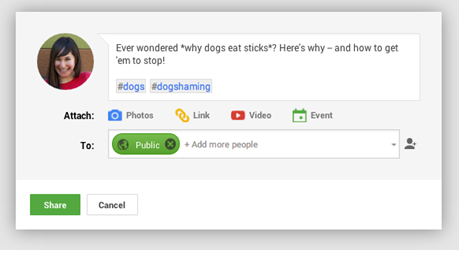
I know, I know, you spent so much time writing your blogpost, it’d be so nice to simply copy and paste a link into your update and call it a day. But you’ll have far more people clicking on your links and a much easier time with the search engines if you put a little more energy into crafting a succinct yet relevant and compelling topic sentence to draw readers towards your blogpost.
And if you really want to get found, be sure to place asterisks around your keywords to bold them. Add in a few good hashtags as well so the search engines can better find you for relevant queries.
3. Use Circles Strategically
One of the best features on G+ is Circles, which allows you to easily categorize your followers so you can deliver them only the blogposts they’re most likely to read. You might, for example, have one circle devoted to people who love your blogged recipes and another devoted to those who are all about knitting. The more relevant the posts each member of these circles receive, the much more likely they are to actually click on the link provided and engage with your post. Even better, relevant posts make it much more likely for potential followers to become actual followers by adding you to their own circles, which means your posts are far more likely to come up high in relevant personalized searches on Google. Great stuff!
As you might have guessed, Circles is also a great way to network with your followers, as you can easily click on each circle and see what people within that category have been talking about lately. This makes it easier to jump into relevant conversations to offer your expertise, or even to find new topics to blog about as you spot what’s trending. (Pro Tip: The “What’s Hot” link on the G+ menu will also give you even wider insight into current hot topics).
There is, however, one caveat with Circles. Adding specific names to your post as pictured below will mean that person will get an email from you alerting them of that post.
That’s great when you’re 100% sure the post is relevant and that that particular follower wants to hear from you so consistently, but it also can be interpreted as, you know, spam. Save your direct mentions for only the most hyper-relevant stuff, or solely for when you want to draw a key influencer or expert in that topic area into a dynamic conversation.
4. Find Your Community
Of course, when you’re just starting out on the platform, it can be difficult to find any relevant followers to market to in the first place. Unless, of course, you make use of Google+ Communities. Something between a LinkedIn interest group and a trade show, Communities has a niche for just about everyone. With plenty of topics to engage in, it’s a great place to meet new potential followers and conduct real conversations. As long as you’ve got a compelling About page to go with your witty conversation, communities are a great way to drive people both into your G+ circles and to your site. It’s like in-person networking, with all the benefits of being online.
5. Jump into the Conversation
On a similar note, it’s important that, once you do start gaining followers on the platform, you stay as responsive as possible to comments both on your G+ posts and on your blog as well. People are much more likely to keep coming back if they feel like you respect what they’ve got to say and that you want to hear more. So, respond to all comments, even if it’s just to say, “Thank you!” You should also +1 comments you especially like, and mention commenters directly as you respond so they’re extra-motivated to reply again. (To do this, simply type +username). Tagging people is also a good idea when constructing your post, especially if you tag influencers from whom you’d like a comment.
Another great strategy is to converse through Hangouts. In part Google+’s answer to Skype, Hangouts is oh so much more than that, allowing you to video chat with anywhere from 10 to 15 followers at a time. Not only will this help you better connect with, understand and cater to your readers, but it’s also a form of video content that can later be archived onto YouTube and made forever searchable. You can keep these Hangouts to simple meet and greets, give participants a discussion theme that’s relevant to a recent post, or do a group activity, say, actually assembling that model airplane you blogged about last week. Why not? Hangouts have as much possibility as you can give it.
6. Claim Your Authorship
Quick questionnaire: When you’re searching for something on Google, are you more likely to click on the link to an anonymous article, or to one that features an author bio and profile photo? The answer, whether you know this consciously or not, is the latter. Author bios and photos just make the results seem more trustworthy, expert and reliable. But how to get your photo and bio up there?
Why, by claiming authorship, of course. Doing so is simple: Just go to the authorship page, add your Gmail address, verify your enrollment and you’re pretty much good to go. Make sure to fill out your G+ profile completely so Google has something to pull from for the bio. Doing this will make your posts much more clickable, and it’s great for SEO, too.
The Takeaway
Sure, Google+ is an increasingly popular platform (yes, despite negative hype stating otherwise), but where it really excels is in terms of user engagement tools. Master those tools, and you just might have yourself a much more engaged blog readership.
Showing posts with label Engagement. Show all posts
Tuesday, 28 January 2014
Thursday, 16 January 2014
Relationships with your audience on Social Media
Are you an online social networking freak? If yes, it’s not too surprising. People's inclination towards social sites is on the increase, which means it's never been easier for businesses with a social media presence to attract and interact with their social savvy customers. Social media is a tool that has revolutionised the way in which businesses provide information, promote their services and engage with their target audience.
Most businesses start out their social media strategies by simply posting their latest updates/features on their Facebook page or Twitter account. They usually post regularly but without any idea of how best to tailor it to suit their audience. This can be a waste of content as without an end goal in mind, the social media strategy has no direction.
The solution to this stumbling block is to be more interactive and engaging with your audience. A good question to ask is 'how can we be more captivating to this particular audience?' People will not find you interesting if all you are doing is trying to sell yourself. It's a good idea to constantly evaluate your social media strategy and to tweak it appropriately.
People love to read interesting information, yes! But they also love it when a businesses listen to their needs and opinions. So begin with asking them questions and take note of the positive and negative responses.
Another good idea is to encourage voting polls on a certain topic which requires feedback from the audience. Also small giveaways can work, whether it be in the form of a simple ebook or a sample of the product you sell. This way user’s trust is gained by the brand. And there are a lot of other ways to increase interaction such as building relations with influencers via twitter. Remember, don’t respond to criticism or messages with the same standardised custom message, make it personal!
Once you have secured enough faith in your customer’s mind about your brand, then you can surface with your content strategies as now you have perceived the taste and interests of your target audiences. The moral of the story is you should share only 20% of the information/assets about your services on social media and the rest should be fun, interactive posts that suit your customers interests.
This kind of relationship keeps the users content and assured.
Most businesses start out their social media strategies by simply posting their latest updates/features on their Facebook page or Twitter account. They usually post regularly but without any idea of how best to tailor it to suit their audience. This can be a waste of content as without an end goal in mind, the social media strategy has no direction.
The solution to this stumbling block is to be more interactive and engaging with your audience. A good question to ask is 'how can we be more captivating to this particular audience?' People will not find you interesting if all you are doing is trying to sell yourself. It's a good idea to constantly evaluate your social media strategy and to tweak it appropriately.
People love to read interesting information, yes! But they also love it when a businesses listen to their needs and opinions. So begin with asking them questions and take note of the positive and negative responses.
Another good idea is to encourage voting polls on a certain topic which requires feedback from the audience. Also small giveaways can work, whether it be in the form of a simple ebook or a sample of the product you sell. This way user’s trust is gained by the brand. And there are a lot of other ways to increase interaction such as building relations with influencers via twitter. Remember, don’t respond to criticism or messages with the same standardised custom message, make it personal!
Once you have secured enough faith in your customer’s mind about your brand, then you can surface with your content strategies as now you have perceived the taste and interests of your target audiences. The moral of the story is you should share only 20% of the information/assets about your services on social media and the rest should be fun, interactive posts that suit your customers interests.
This kind of relationship keeps the users content and assured.
Monday, 13 January 2014
8 Ways to Keep Your Social Media Updates Fresh
Small business owners managing their own social media often ask the same question: "How can I keep my updates fresh and engaging?"
It's no easy task. If one were to poll marketers and business owners alike, he or she would find that creativity and the challenge of keeping updates from becoming stale is a top concern in social media. Luckily, at Omnicore Agency, our team of social media experts never run out of good ideas.
Taking a page from their book – and asking their recommendations – we've compiled a list for you to use the next time you get stuck on what to write, or for those moments when you need your content to pop, or those instances where you want to take what you've been doing to the next level. No matter what your social media challenge, these tips for keeping your social media updates fresh are sure to make managing your social channels a whole lot easier -and more successful!
Questions alone, on the other hand, are good for getting valuable feedback and sparking conversation. Just make sure the questions aren't too complicated or too controversial. Think of questions you might ask in a focus group or customer survey, or go for the conversational/laid-back sort of questions one might find in small talk – you may be surprised on who you connect with! Speaking of questions, also use your social channels to answer them. If you have FAQs, do a Q&A post series and then make that content perform double duty by turning those Q&A updates into a blog post or other content piece. Answer questions builds credibility and connects with the customer.
These are just a handful of tips (there are countless more and we'd love to hear some of yours in the comments!) for keeping social media updates fresh. The key thing is to not do the same thing over and over again. You know this as a common sense takeaway, but it can be tempting to do so. Remember that Mark Twain quote about insanity – it's when you do the same thing over and over and expect a different result. Don't do only the same things!
Article Source: http://socialmediatoday.com/salman-aslam/2059286/8-ways-keep-your-social-media-updates-fresh
It's no easy task. If one were to poll marketers and business owners alike, he or she would find that creativity and the challenge of keeping updates from becoming stale is a top concern in social media. Luckily, at Omnicore Agency, our team of social media experts never run out of good ideas.
Taking a page from their book – and asking their recommendations – we've compiled a list for you to use the next time you get stuck on what to write, or for those moments when you need your content to pop, or those instances where you want to take what you've been doing to the next level. No matter what your social media challenge, these tips for keeping your social media updates fresh are sure to make managing your social channels a whole lot easier -and more successful!
- Don't Always Talk About Yourself: This is the key to success in social media. Don't just share links to your site or overly promotional posts. Be human, be conversational, and talk about the good words of others, including sharing their content, their links, or their creations (with credit, of course)!
- Check the Date: No idea what to post? Check the calendar! Each month - or even each day or week, for that matter – plays host to a variety of holidays, awareness weeks, and events. Find the ones that tie in to your business and find a way to connect with your audience over those occasions. Not only is it timely, but it's also unique. Try implementing date or time-specific promotions through social media that relate to the occasion, host chats or streams using hashtags relating to that event to raise awareness and generate conversation, or create graphics associated with that specific event and share them throughout your social channels.
- Crowdsource: Your social networks are a goldmine of opportunity for content, so source from them on occasion when you need a break. Ask for photo submissions for a contest, or retweet their answers to a poll, prompt, or question. It gets the conversation going and has the potential to grow your audience at the same time. Bottom line: ask for their input!
- Quotations and Questions: Questions and quotations are always good for sharability and engagement.
Questions alone, on the other hand, are good for getting valuable feedback and sparking conversation. Just make sure the questions aren't too complicated or too controversial. Think of questions you might ask in a focus group or customer survey, or go for the conversational/laid-back sort of questions one might find in small talk – you may be surprised on who you connect with! Speaking of questions, also use your social channels to answer them. If you have FAQs, do a Q&A post series and then make that content perform double duty by turning those Q&A updates into a blog post or other content piece. Answer questions builds credibility and connects with the customer.
- Add Visuals: Adding videos, photos, or graphics instantly makes your status update more attractive, plus, it boosts your potential to have it shared across multiple channels (research shows it!) . Take the time to enrich a post with a photo or a video you've created – you'll be surprised at the increased levels of engagement you'll see as a result.
- Make the Next Step: Post a teaser of something and then link to the content or landing page where they can get more info or explore something more indepth. Think calls to action when you make your updates!
- Search for Sources: Stuck on where to find the topic of your next tweet or status update? Check these standby sources for new information and inspiration:
- Today's Headlines: current events are always a great way to generate conversation. Just approach with caution and make sure you're choosing topics that are relevant and reflective of your brand in a positive way.
Industry blogs or websites: see what the buzz is in your industry and share it with your audiences!
Your competitor's websites and media channels: if your competitors are writing, tweeting, or blogging about it, it's valuable – look at what they're doing and see how you can do it better.
YouTube: videos are great ways to look at a topic from a visual angle. Look for industry relevant videos and see how they might be shared or turned into a status update. - Flickr: like YouTube, Flickr can also be a great way to get inspiration for a status update, simply by looking at a topic from a more visual angle.
- Pinterest: do a search or two for phrases relevant to your industry and see what content is out there – can you create something similar or better to share?
- Slideshare.net: look for slideshows for snippets of information that are ultra-sharable through social media and may inspire presentations of your own.
- Your swipe file: if you don't have one, you need one! Here's how to make one.
- Your latest newsletter: look through your latest email marketing blasts – is there something there that could be shared through social media too?
- Your blog: check your blog for recent posts and see if you can condense down your post takeaways into tweetable, shareable, or Facebookable snippets.
- Short and Sweet: Research shows that on Facebook, shorter posts tend to perform better in terms of engagement and views, so keep that in mind when making an update. Don't be afraid to make a short exclamation and let it roll from there.
These are just a handful of tips (there are countless more and we'd love to hear some of yours in the comments!) for keeping social media updates fresh. The key thing is to not do the same thing over and over again. You know this as a common sense takeaway, but it can be tempting to do so. Remember that Mark Twain quote about insanity – it's when you do the same thing over and over and expect a different result. Don't do only the same things!
Article Source: http://socialmediatoday.com/salman-aslam/2059286/8-ways-keep-your-social-media-updates-fresh
Labels:
ADVERTISING,
Best Practices,
Blogging,
Community,
Content,
Engagement,
fresh updates,
marketing,
original content,
Public Relations,
Research,
social media,
social media marketing,
social networks,
strategy
Subscribe to:
Posts (Atom)


