Showing posts with label Social Media Management. Show all posts

Sunday, 29 December 2013

Social Media Marketing what to look out for in 2014

Social media has become a massive part of our day to day lives. It is also a key tool when it comes to marketing your business and its products or services. Businesses across the world big and small have been taking advantage of social media to engage with their customers. We are going to to take a look at some of our predictions for 2014.

Image: http://bryandigital.wordpress.com

The Micro-Video Takeover

The revolution has already started with the increase in popularity of social networks such as Vine, Instagram and Snapchat. In a fast moving world the 3 minute video has been killed off by 6 seconds of fireworks. The rise of these networks has led to more real time video sharing, where people are creating and sharing direct from their smartphone meaning you could be anywhere doing anything and able to share a video. These 6 second wonders are sure to change the startegy of most videos going on social media now.


Pictures means success

Brands that have used images to share content have huge success with some brands saying that Pinterest and Instagram have actually increased revenue by 5%. This will continue in 2014 and can only get bigger with the likes of Pinterest becoming very important power players rather than being a female dominated network. This is already proving true with Pinterest being the fastest growing network but it also provides greater traffic as well than anywhere else.


Google+ will come into its own

Google+ has always been seen to be chasing the pack but 2014 could be the year that people start to see the full potential of Google+. Google+ currently has the 2nd highest monthly users and that can only increase, on top of this it also has a bigger ownership in terms of of search power. As more and more people begin to use Google's products users will find that they are using Google+ more as integrates all interactions in one place across all Google products. Google authorship will also become a major part of its rise as it will play a huge part in Google's new ranking algorithm.


Social Media is a must if you want to survive

While social media is a big marketing tool at the moment in 2014 it is going to become essential for every business not to just have but be using to engage and promote their brand with customers. Many are seeing how the positive influence of social media is increasing traffic, creating more leads and gains in revenue. Businesses will realise that they will need some knowledge to make sure they take advantage of social media so training or management of a business social media accounts will be needed.

Friday, 30 August 2013

Should Your Business Have A Google Plus Page?


The simple answer to this question is yes. You might as well set one up now because, if you don’t, every time you log onto your YouTube channel or your Gmail account Google is going to pester you to set one up anyway. Of course, you might not have a Gmail account or a YouTube channel. If that’s the case, and you never intend on getting them then, well, you should probably still set up a Google Plus Page for your company.

As I mentioned previously, Google is trying to get all its users, no matter what part of Google they are using, to sign up for every Google service imaginable. To be honest, though, signing up for every Google service imaginable isn’t too bad an idea. Gmail is a popular and respected email service. YouTube is the biggest video sharing site out there. Drive is great for sharing files. Calendar is perfect for companies that need to share work schedules. Blogger is a very good blog site. Search is… Well, it’s the original Google, the most successful internet site of all time.

So, all of Google’s services are useful, even the ones I didn’t mention above, but why do you need a Google Plus Page? All you need to sign up to any Google service, after all, is a Gmail account. Well, it turns out that Google are so proud of their social network they want everyone to start using it, despite its lack of popularity when compared to the likes of Facebook.


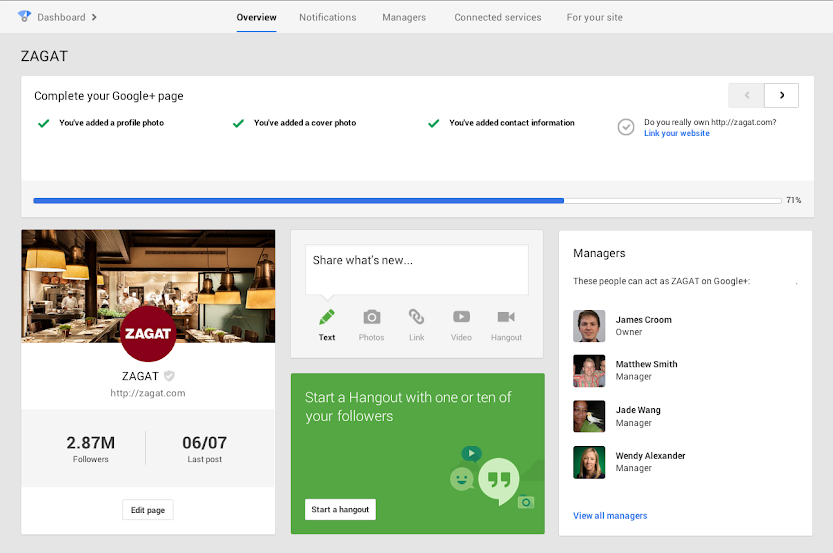
To persuade people to use Google Plus, the search giant released a special dashboard a couple of months ago. From this Google Plus dashboard, users can organise their business’ profile and settings on many Google services: they can change their company address on Google Maps, they can manage their YouTube channel and they can change their company’s search results on Google Search.

Search is how Google made its name. It’s the most popular search engine online and it makes the most money of all the free-to-use websites. Maintaining an active presence on Google Plus, by setting up and managing a Page for your business, helps your company rank in Google Search – not just your Google Plus page, your website as well if you link the two together.

Don’t get me wrong, Google Plus has a number of great features as well as the dashboard. On the service, you can post diverse content with interesting hashtags to drive conversation. You can follow, comment, +1 and interact, potentially gaining your company new clients and customers. You can find communities that are relevant to your business and connect with likeminded people. Best of all, you can use Hangouts to run video conferences.

When Google last updated Plus, adding hashtags and changing the stream, I noted that, although the features improved the social network, people still wouldn’t flock to it. Google announced, last year, that400 million people were on Google Plus. In may this year, that figure went up to 500 million. At the time this seemed like a stretch. The reality was that 500 million people were signed into a Google service, be it Gmail, YouTube or docs, but they were not necessarily maintaining an active Google Plus account.

For the reasons I have mentioned above, though, its still worth setting up a Google Plus business page. Don’t put as much effort into it as you would your Twitter, Facebook and LinkedIn accounts, but make sure it’s there so that when you need it (and, considering Google’s domination, you soon might) you can access it in a moment.

Tuesday, 27 August 2013

How To Use Social Media For Viral Marketing


Viral marketing depends on word-of-mouth: the willingness people have to share the things they see and enjoy with their friends. Thanks to social media, sharing content has never been easier. Popular posts and pictures can spread around the internet like wildfire, gaining the person or company that posted it a lot of great publicity.

Frustratingly, however, viral marketing is very difficult: as much as you prepare your content and share it online, there’s no way to predict how well your posts will do. In order to be with any chance of your content going viral, preparation is key. Here are a few tips and hints on how to successfully implement social media in your viral marketing strategies.

Prepare

If you’re creating content that you want to go viral, then you need to know your audience. There’s no point in creating content that will attract 18-25 year old, single men if you’re trying to promote a family car. You also need to work out what sort of content you want to use. Any type of content can go viral – tweets, images, infographics, articles – but videos go viral more frequently and in a bigger way than any other type of content. Choose a type of content that will work for what you’re trying to promote, will appeal to your audience and can be shared across numerous social media networks.

As I said earlier, preparation is key to viral marketing. You need to be prepared if your social content does go viral on social media. Even if you’re content goes viral, you might lose out if you can’t follow up on it. You need to make sure that you can engage with people who enjoy your content, and then follow it up with a campaign. Viral content rarely lasts very long, it’s more of a flash in the pan, but if you follow up successful viral content with a campaign you can keep it in the public eye for longer.

You also need to make sure that you maintain active social media accounts before you attempt viral marketing. If you just post something cold, it’s unlikely to do very well. Instead engage and interact online: share and comment on other people’s content and maybe they’ll share your content. Whatever content you post you also need to make sure that it’s mobile compatible – almost 30% of social media users access sites on their mobiles.

2. Make it Sharable

Content can only go viral if it’s easy to share and people will only share content that they find interesting. Make sure that your content is compelling and appealing and, very importantly, that it isn’t too long: people want content that gives them instant gratification. Also, the faster content can be enjoyed, the quicker it will get shared. Last month, Unruly released a white paper detailing how to make content sharable. They concluded that content has to elicit a strong emotional reaction in order to get shared. Create content that is funny or exciting: the more funny and exciting, the more likely it will be shared.

You also need to make sure that, if your content is posted on sites other then social media platforms, the share buttons are very obvious and easy to use. Put on a tally so that people can see how often your content gets shared on social media as an added incentive. Content with high share tallies persuade people that they are popular, and that sharing them is the usual thing to do.

You could even offer a reward to people who share your content: make a competition where the entry is dependent on sharing a photo or video, and then reward the winner with a prize. You also want to get the right people sharing your content. Try to publicise your content to people with large followings on social media. A celebrity endorsement can boost sharing and engagement massively.

3. Start a Conversation

When it comes to viral marketing, being controversial can be one of the best strategies to ensure success. It your content touches on a controversial subject, dividing opinion, you can start debates in the comments sections of social media sites. This will, in turn, draw more attention to your content as people will see their friends commenting on your content in their news feed on Facebook, or theirTwitter/Google+ stream.

Often, topical content sparks the best conversations. Stay abreast of what’s happening in the world: a story or item of news that might be relevant to your industry can be leveraged to promote your business. Content centred on a popular news article can draw the attention of people checking it out.

Going viral is never assured, however much you prepare, and there really isn’t a sure fire way that you can make your content viral. However, by following these steps (and with a lot of luck), your content might well go viral on social media sites.

Has any of your content gone viral?

Tuesday, 20 August 2013

How To Optimise The Images On Your Business’ Social Media Pages

image


Images are incredibly important on any social media profile, whether they are the ones you use for profile and cover images, or the ones you share. Last year, more than one third of links shared on Twitter and over half of the posts on the Facebook news feed were images.

 Images are popular because they are eye-catching and instantly gratifying. However, when uploading images, the content is not the only thing that must be considered – you must also think about the file size of the image and its shape.

Here are some ways to optimise the images you display on the five major social media sites: Facebook, Google+, Twitter, LinkedIn and Pinterest.

 General

 Whatever site you are uploading an image to, make sure that the file name is relevant to the image. So, if the image shows a red dress from your summer collection, call the image summer-dress-red.jpg. Naming your images appropriately will increase the chance of them showing up in the correct image searches.

You’ll notice that I named the image file as a JPEG. There are a number of image files you could use – JPEG, GIF or PNG – but using a JPEG is the best option. JPEG files can be compressed considerably, but still be of decent quality. Use GIF files for thumbnails and never large images. Use PNG files as an alternative to either of the other two.

Most importantly, make sure that all your images are eye-catching and relevant. Post regularly and respond to comments that your images get. Work out what images get the most likes, +1s and shares and when, then figure out the best strategy to take advantage of popular images.

Content that you post on any social media site will appear in the feeds of your friends, followers and connections with a miniature version of your profile picture alongside. Make sure that, even as a thumbnail, your profile picture is easy to make out.

Bear in mind that social media sites are constantly changing, so although the image sizes in this post are accurate (as of 29/05/2013), be sure to double check online.

Facebook


Facebook cover photos are the first thing visitors to your page will see, so make sure that it grabs their attention. The frame for the Facebook cover photo is 815 pixels wide by 315 pixels high. Your profile’s cover image has to be clearly related to your company, and it cannot mislead or infringe on anyone else’s copyright. Covers cannot display more than 20% text and they cannot contain display text asking users to share the image.

The Facebook profile picture overlaps the cover photo close to its bottom, right-hand corner. It is 160 x 160 px, but the image you upload to fill the space must be over 180 x 180 px. I would advise using your company logo as your profile picture, but try to be creative with your cover photo. If you have the time, change it every month or so, or use it to advertise new offers or products you have. Make sure, however, that you follow Facebook’s rules.

Timeline images are displayed at up to 403 x 403 px in the preview, and 960 x 720 px in the lightbox. Images up to 2048 x 2048 px can be uploaded. If an image is 403 pixels wide and 603 pixels wide 200 pixels will be cut from the preview, which would look awful if those 200 pixels are of vital importance. Don’t expect visitors to your page to click on previews if they can’t see the entire image, they are only going to enlarge images that intrigue them.

Google+


Google+ cover photos are significantly larger than their Facebook counterparts, measuring 2120 x 1192 px. When a user visits your page however, they only see the bottom third of the image, having to scroll up to see the rest. You need to make sure that the bottom third of your cover image contains all the necessary details to catch the visitor’s eye.


Current Google+ photos are circular, rather than square, which is great for companies with circular logos as it cuts down on negative space, but not so great for those with square logos. If your company has a square logo, work out how best to fit it into the circular frame.

It is especially important that you optimise the SEO of all the images on your Google+ page, as well as the ones you share, because Google indexes everything on its social media site, making it more likely to appear in Google Search. If a search of your company can take someone to your Google+ page, it gives them the opportunity to engage and interact with you and the images you post.

 Twitter

 Unlike Facebook and Google+, Twitter allows you to create and upload a background onto your profile page. When you create and upload your background page, ensure that all the important content is visible by placing it on the right and left-hand edges, so that it doesn’t get hidden by your stream, navigation bar, uploaded images or header image.

The header image is 520 x 260 px, but be aware that your 81 x 81 px profile image sits pretty much right in the middle – you don’t want your profile image blocking part of your header image, especially if you have put your contact details on there.

 
When you are posting an image on Twitter, there are three different Twitter cards you can use: the Large Image Summary Card features an image prominently, with the corresponding article summary beneath; the Photo Card is ideal if you just want to post a photo; use a Gallery Card for collections of images.

In stream, a tweet with an image will have a tiny photo icon at the bottom, with “View photo” alongside. An image within an expanded tweet is 375 x 375 px, whereas an article preview image is 120 x 120 px. All the images you tweet can be viewed in a picture gallery on your profile.

LinkedIn

Your company’s LinkedIn profile page has a number of tabs with customisable banners across the top. The Home page banner and the Products & Services banner are both 646 x 220 px. Treat your Home page banner like your Facebook or Google+ cover images: use an eye-catching image that is relevant to your company. Be creative with your Products & Services banner. Why not update it regularly with new products or special offers?

The Careers cover photo is slightly larger, 974 x 238 px, giving you even more space to play with. Change the Careers photo every so often to keep your page fresh. All the banners are limited to a 2 MB maximum size.

Pinterest

Of all the social media sites in this list, Pinterest is the most image focused. Pinterest is all about discovering cool and interesting images and pinning them onto your own boards. The better the images you pin to your own boards, the more likely people are to follow you.


If you are a company with tangible products, find interesting ways to post them on your boards. You can even add pricing and availability information to products you pin on Pinterest using rich pins.

Images you post on Pinterest can be of any length, but in the preview they have to be 192 px wide. When enlarged, a pin can still be of infinite length, but is limited to 600 px in width. The profile picture frame on Pinterest is 160 x 165 px. Choosing the correct 222 x 150 px cover image for each of your boards is also important – it should either be the most eye-catching on the board, or the one you want more people to pin.

Monday, 19 August 2013

The Importance Of Knowing Your Audience On Social Media


To create a successful social media strategy for your business you must know your audience. Social media is all about communication and conversation, how can you have a proper conversation if you don’t know anything about the people you are talking to? Before you create or post any content, you need to know who will see it. If you only know a little about your audience to start off with, using that to your advantage when creating a strategy can help you not only engage with your audience, but also understand more about your audience as a result. Here are the questions you should ask yourself in order to help you get to know your business’ audience on social media:

1. Why?

Posting content without prior knowledge of its potential audience is just a Random Act of Marketing: you might have some success, but your content won’t have anywhere near the same amount of engagement as content posted with a targeted audience in mind.

For your social media strategy to have any success, you must first work out who you are trying to reach and then the best way to reach them. Be aware that different networks will have different audiences, so make sure you create content which suits each social media site.

2. Who?

So, knowing your audience on social media is of the upmost importance. After the ‘why’, though, comes the ‘who’: who are all the people following you on Pinterest, Twitter, Facebook and Google+? Who are all the people sharing and engaging with your content? Who is retweeting you on Twitter and repinning your pins on their Pinterest boards?

You need to work out who engages with your content in order to work out what sort of content they are more likely to engage with. Find out what demographics your fans belong to: their age, gender, professional status, location and income. For example, if your fans are predominantly of a younger demographic, they might be more likely to share funny or fashionable content.

If you’re not sure who your fans are on social media (bear in mind we haven’t got to the ‘how’ yet) it’s a good idea to find out what demographics your brand appeals to outside of the world of social media. Your customers in the real world will give you a great insight into your fans on social media. However, there are other variables that need to be taken into account, so don’t just presume that your fanbase is made up purely of actual customers: you may discover a completely new support base online thanks to your adoption of social media.

Always be aware that the number of people engaging with your content is miniscule compared to the number of people who aren’t, but could be. There are those that see your content but don’t engage, as well as the millions who haven’t even see your content yet. Make sure you don’t just create content to please the people engaging with it already, create content that will attract new fans and followers: after all, you want to be building your support base, not just maintaining what you’ve got.

Having worked out who your fans and followers are, and what makes them tick, you should work out who the most influential people within your fanbase are. Find out which of your fans have the most followers themselves, and which fans get their own content shared the most often. If you can identify the influencers within your fanbase, you can engage with them more frequently and perhaps create a few brand ambassadors.

3. What?

There are actually a number of ‘what’ questions you need to ask yourself when researching your social media audience. The first, and arguably the most important, is ‘what are people saying about your company?’ Not only will this give you an insight into what your audience want from your company and from your social media presence, it will also help you better engage with customers and monitor what they think about you. You should always be monitoring sentiment analysis to get a better understanding of your customers and how your brand is perceived.

You should also find out what your fans and followers are saying on social media in general. Very often a throwaway tweet or Facebook status can give you a great insight into what a customer’s wants are. By monitoring what people say and post, you can also find out what your audience’s interests are. Create content that will pique the interests of your audience and make them more likely to engage with you.

What networks are your fans on? If your audience is far more active on Twitter than on Pinterest, and you don’t have enough time to manage both, focus on posting content and engaging with followers on Twitter to make the most of your social media presence. In answering this question you may also discover more about your audience, as different demographics prefer different sites. Of course, this means that if you have a similar number of fans on Pinterest and Twitter, they won’t necessarily be the same, so you should tailor your content to the site it is posted on and the people who will see it.

The final ‘what’ question you should ask of your audience, a question that is getting more and more important as mobile social media use increases, is ‘what devices are my fans and followers using to check their social media?’ It is no good posting image-laden content if all of you followers are on mobile, as they won’t get the full impact of a large image on a phone.

4. When?

There is only one question in this section, but discovering its answer is vital to the success of your business’ social media strategy: when are your audience active online?

Don’t post your content in the evenings if your audience is using social media in the morning, as they won’t necessarily see it; post when the majority of your audience is active on social media so that they are more likely to see it and interact with it. Ideally, of course, you will be able to post content regularly throughout the day but, if not, work out the best strategy in order to get the most views, engagement and reach.

5. How?

So, the burning question: how do you find out all you need to know about your business’ audience on social media? Well, you can always ask. Ask questions on Twitter and Facebook about what your customers like and dislike, what makes them tick, or create surveys to discover more about your fans and followers.

Take the time to research your audience. How do your followers describe themselves in their Twitter bios? What have they liked on Facebook? Don’t forget to measure the success of your own campaigns within your audience.

Another important question to ask your followers is how they found out about you. This can give you a great insight, not only into the minds of your audience, but also into how successful your social media presence is. Again, you can use a survey to do this.

There are a number of analytical tools which you can use to make researching your audience easier: Klout can help you work out which of your fans and followers are the most influential, while Followerwonk can help you delve into the details of your Twitter followers.

How do you research your social media audience?

Friday, 16 August 2013

Why You Should Use Twitter As A Customer Service Tool


Twitter, as everyone knows, is a fantastic B2C communication tool, helping companies to connect, engage and interact with their followers and customers. One of the advantages of Twitter’s readily available communications network, is that customers can directly contact companies by including their Twitter handle in tweets.

Companies should always pay attention to the questions and queries mentioning them on Twitter. By monitoring and responding to these questions, a company will improve its reputation on the social media site. The companies that respond to their customers tweets are often well regarded, by customers and the general public alike. Analytics site socialbakers recently released figures showing the top 10 fastest responders to Twitter queries. Halo BCA, the fastest company, has an amazing response time of 3 minutes.

Of course, response speed isn’t everything but, as communication becomes more and more instantaneous, it becomes increasingly important for companies to respond to queries, questions and comments on social media sites as quickly as they can. Here’s how you can use Twitter as a customer service tool.

Respond To Mentions

Try to respond as quickly as you can to comments, questions and queries to do with your company. Monitor and search through the tweets which mention your company on Twitter. Try to respond to all of the questions, even though this may take time. Search Twitter for comments about your company that don’t include your Twitter handle, not everyone will mention you directly if they have a complaint to make, but they will probably appreciate you taking the time to respond.

Of course, you don’t have to respond to all the comments – the ones that are downright offensive, for example – but it’s best to monitor and analyse the sentiments expressed online about your company. Use a tool like Ezeesocial to manage, monitor and respond to all the questions and queries you get on Twitter.

If you run a larger company, it might be worth creating a dedicated customer service Twitter handle – 30% of Fortune 100 companies have a specific customer service Twitter site. A dedicated customer service account can draw attention away from negative comments about your company, as well as helping you manage complaints and queries.

Be Polite

Be personal and polite. Always answer customer queries and complaints with an apology and an offer to help. To make it even more personal, you could use the ^ symbol and include your initials. By doing this, customers will know they are talking to an actual person and not a faceless company. You could also address your customers by their names: check their bio or Twitter handle, their name will often be there.

There are examples on Twitter of employees judging the tone of tweeted queries and changing their response accordingly. For example, telecommunication agency O2 made headlines last year by responding to a customer complaint in London slang. O2 were not only able to help the customer with his problem, they also got a lot of publicity for their brand. Of course, I would generally advise against this approach as it is more likely that you will offend the customer than anything else, but it’s always worth assessing the tone of customer queries and complaints anyway, in order to judge how best to respond.

For that extra personal touch to customer service, you could even follow up the more difficult customer problems a few days or a week later. Just tweet the customer after a week to make sure they aren’t still having problems. Try not to be too invasive, however, and don’t be offended if they don’t respond. Most customers who you help will be happy to compliment you on Twitter, which can really help your reputation.

Always Respond

You should always try to respond to questions, even if you can’t answer them. By acknowledging someone’s query, you ensure that they know that you are listening. If you don’t know the answer, direct

them somewhere they might find it. Of course, it’s always better to try to give them the answer yourself.


If someone has a complaint that can’t really be expressed fully in tweet form, then ask them to direct message you their personal details, privately, so that you can continue the conversation on the phone or via email. A phone conversation is probably the best option: talking to a customer directly is often the fastest way to get a problem sorted. Of course, Twitter is great as the first line of communication, as it takes less time and effort to answer problems on the service.

Be Proactive

You don’t only have to respond to direct customer queries about your company, you can also look for tweeted questions to do with your industry that you can answer. You could even find funny or interesting questions to respond to, if you feel that you could shed some light on the subject.

Make sure your Twitter handle is in an obvious place on your website so that customers know how to get in contact with you. Put recently asked questions and answers in the FAQ section on your website: most people will look through this before turning to Twitter to help. It’s sometimes worth posting these FAQs on Twitter: useful information that might help your followers and customers.

Hopefully, your customers won’t have too many queries or complaints, but in the business world, they are inevitable. Thanks to Twitter, companies now have a platform on which they can communicate quickly and easily with their customers and vice versa. Twitter really is the first line of b2c communication in the modern world of social media.

How do you use Twitter as a customer service tool?