Showing posts with label images. Show all posts

Saturday, 28 December 2013

3 Ways to Become a More Visual Social Butterfly

More and more, it seems like people don’t use the internet to read. They use the internet to see. Whether they’re clicking through photos on their friend’s Facebook wall, pinning recipes they want to try, or watching cats do hilarious things on YouTube, users want visuals. And not just any visuals, they’re drawn to images that pop, images that make an emotional impact, images that are useful. It explains the popularity of sites like Pinterest and Instagram and apps like SnapChat. People just love sharing images.


But how do brands fit into this? According to Digital Insights, who compiled an impressive number of social media statistics for the year 2013, surprisingly well. According to a survey, 46% of web users turn to social media before making a purchase. While they’re on those networks, it is the visual information that stands out. Socially Sorted, who published an infographic on the subject of the increasingly visual social landscape, explains that users are more likely to engage with brands who post pictures more than any other type of media. In addition, photos on Facebook get 53% more likes than any other kind of content.

Okay, you’re convinced. Now how can your business become more visual? Keep reading for some great advice!

Less Words, More Images

Next time you’re about to post to your social media account, stop and think for a moment. Would this post be better-expressed or more successful with a beautiful image alongside it? The answer will be yes 99% of the time. Show, don’t tell.

But how do you come up with these images? If you don’t have a professional photographer or designer on board, try purchasing stock photos or using Creative Commons images. If those won’t do and you’re not a great photographer, slap a filter or some words over it and no one will be any the wiser!


Be the Source of Creative New Content

Did you know that 80% of all pins on Pinterest are re-pins? That means that 80% of the images on Pinterest are just re-shared images that somebody else pinned to the site originally! And although Facebook’s image sharing works in a different way, the number of content creators is still relatively small compared to the number of content sharers.

Take advantage of this by being the source of interesting content that people want to share. Quotes, memes, and videos share well on Facebook, and quotes, infographics, and tutorial-style images do well on Pinterest. Depending on where you want to grow your audience, keep in mind what does best on each platform. A highly-detailed image explaining pricing for web design might be extremely successful on Pinterest, where long and tall images have the advantage, but cropped and squeezed onto a Facebook feed it won’t do as well.


Crowdsource Visual Content

Some of the most successful social contests involve user-submitted images. In this type of contest, your fans and followers create an original image according to your guidelines and submit it to you. At the same time they share it with their own friends and followers. Their followers see it and may choose to participate as well, expanding the reach of your contest. Even after the contest is over and the prize has been awarded, you have a unique gallery of creative images that followers might enjoy.

To see an example of this, look no further than Colonel Meow’s “Cat Fro” photo album. Since he is one of the most widely-followed cats on Facebook, fans seeking their moment of fame were quick to stick their cat on top of their head, snap a photo, and start submitting images. Even though the collection is no longer being added to, the album is still full of cat afro photos to see and share.

Hopefully these three tips will help you become more visual on social media. Just remember, don’t tell when you can show, create instead of curating at least some of the time, and take advantage of crowdsourcing when possible.

Friday, 18 October 2013

New SnapHack App Allows You to Save Snapchats

A new application, called SnapHack, was released on iTunes on the 14th October allowing users to save Snapchats to their phones. The app counteracts Snapchat’s purpose of sending instant pictures which self-destruct automatically after a short amount of time by allowing users to save messages that they receive from Snapchat, without the sender having any knowledge. Will this change the way that we use Snapchat and defeat its intentions?


In order to use the app you have to log in to SnapHack with the same username and password that you use for Snapchat. When you open SnapHack all unopened Snapchat images will then download onto the app, and you will be able to save them to your phone. The app will only work if the first time you open the image is in SnapHack and it has not already by opened previously in Snapchat as anything that has already been opened in Snapchat will self-destruct as it normally does. This defeats the purpose which Snapchat was created for – so that you would be able to send instant pictures to your friends which would not be stored for longer than the time frame which you specified. Snapchat was also designed so that you could send the images to only the friends that you wanted to allow to see the image, however, now there is the possibility that SnapHack users can download the image to their own phone and then they will have control of whether they wish to distribute it to more people without the original sender ever knowing.

The app is being sold for £1.49 on the Apple app store and according to the founder, Darren Jones, its purpose is to point out the dangers of sending images that you might not want people to see to others, as nothing is 100% secure once it has been uploaded to the Internet. The extent to which he is actually educating Snapchat users can be questioned, as this new feature has potential to do much more harm than good.


Snapchat users could previously have saved screen shots of Snaps which they had been sent but this new feature is different because it does not inform the sender that their image has been saved. Users of SnapHack will be able to save an image sent to them via Snapchat, and could pass the image on to others while the sender is left completely unaware at what might be going on.

This leads to the question of how great the demand for an app like this will be? Will people be deterred from using the app because they feel that it might change the way that Snapchat is used? If you are aware that your images might be saved without your knowledge, it could lead the app to become less fun, taking away its original intentions – that you could really be yourself, without having to worry that it would go down as a permanent internet record.

However, there are some problems with the App. SnapHack is currently in contravention of Snapchat’s terms of service which states that it does not allow the development of ‘any third-party applications that interact with user content or the service without our prior consent’. The inventor of the app, Darren Jones, told the BBC that: ‘Snapchat has not been in touch and I imagine it’s only a matter of time until they request that my app is removed… But my app just proves and informs people that these apps exist and people need to be careful’.

Although there is the possibility of the App being closed down, there have also been rumours that Jones is now working on an improved version of SnapHack which allows Snapchat users to forward saved messages to other friends.

With the latest introduction of Snapchat Stories, and the increasing use of Snapchat by brands to advertise on the platform, it has been seen as an app growing in popularity and with a lot of potential. Do you think the creation of apps like SnapHack will change this?

What do you think?

Would you download the SnapHack app? Or would it ruin your experience of Snapchat?

Friday, 11 October 2013

Five Quick Tips For Better Instagram Photos

With roughly 130 million monthly users uploading 45 million photos and videos everyday, Instagram remains the most popular dedicated photo sharing platform. If you want to make your pictures stand out among the selfies and cat pics, here are five photography tips to help you create compelling images. These tips are simple to execute, can be done with any smartphone or tablet and will give your photography a more professional look.

1. Shoot during the golden hour

Shooting in the last hour of daylight makes for golden hues and gentle shadows. Photo credit: Amadou Diallo.

Photography enthusiasts have long known that one of the tricks for getting great natural lighting is to shoot during the first or last hour of daylight. Known as the golden hour (or magic hour), these times of day are especially photogenic because the sun is sitting low in the sky, creating a warm golden glow in the scene. A low-lying sun also means you avoid harsh midday shadows that can make for difficult exposures with typical smartphone sensors.

2. Set the scene
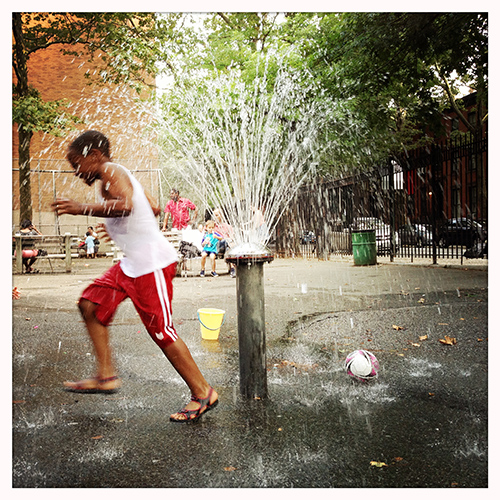
You can get great results by composing a scene around a central subject, like this playground fountain, and then simply waiting for something interesting to happen. Photo credit: Amadou Diallo.

Much of the art of photography lies in waiting for moments to happen. But this is not the passive affair that you might think. Most pros spend much more time planning what they’re going to shoot than they do actually taking the pictures. Of course, few of us can devote an entire day to setting up a single shot, but simply finding an interesting scene and then waiting for something to happen inside it can pay big dividends. The next time you see a background or foreground element that catches your eye, take the camera out and wait for something even more interesting to happen within the frame.


3. Get closer
Holding the camera very close to your subject allows you to create a blurred background. Photo credit: Amadou Diallo.

Photographers have long relied on shallow depth of field as a creative tool to draw attention to an in-focus subject by placing background elements out of focus. Unfortunately, your smartphone camera has a relatively wide depth of field, which means that nearly everything in the scene is always in focus. You can achieve at least a slightly blurred background, however, simply by getting very close to your main subject. Most smartphones will allow you to shoot from as close as 3 to 6 inches to your subject, so experiment with getting right up to small objects like flowers, jewellery or food and let all of the objects in the distance blur.


4. Change your perspective
Getting down low for a shot can place emphasis on scene elements that are closer to the ground and make taller elements seem more imposing. Photo credit: Amadou Diallo.

One of the easiest ways to capture more interesting images is to break the habit of always shooting with your smartphone at standing eye-level. Instead, experiment by shooting the same subject from different angles and perspectives. Squat down for a low-level point of view. Or stand on something high to shoot down on your subject from above. Different perspectives can convey distinctly different moods.


5. Shoot in BW

Shooting in BW can make for dramatic and timeless images. Photo credit: Amadou Diallo.

Few things can make a scene more dramatic than shooting it in black and white. Instagram, like most third party photo apps has options to convert a colour image to black and white after the image is captured. And some apps, most notably Hipstamatic, even shoot in BW exclusively. One key thing to keep in mind is that without the presence of colour, brightness and contrast become even more crucial to the composition. Because of this, images that work well in BW often contain strong lines, bold shapes and contain prominent areas of both highlights and shadows in the scene.

These simple tips are well within reach of even novice photographers yet can lead to much more interesting images in your Instagram feed no matter how much experience you have. Have some favourite photo composition tips of your own? Let us know in the comments below.

Article Source: http://www.forbes.com/sites/amadoudiallo/2013/08/31/five-quick-tips-for-better-instagram-photos/